Cannot connect to SonicWall with any browser
Posted in Networking > SonicWALL
I cannot connect to our SonicWall NSA220-W firewalls with any browser. They all produce errors, as shown below. All the fixes I can find say “try another browser” or get on the SonicWall to change settings, but I am unable to get onto them. I tried the following Firefox changes which did not work: bypassing the “ssl_error_no_cypher_overlap” error in Firefox 34 – Ryan and Debi. Also tried following and did not work: Unable to log into If.com on-line banking account | Firefox Support Forum | Mozilla Support. Any suggestions about how to fix this?
Chrome:
ERR_SSL_VERSION_OR_CIPHER_MISMATCH
IE
This page can’t be displayed
Turn on TLS 1.0, TLS 1.1, and TLS 1.2 in Advanced settings and try connecting to https://x.x.x.x again. If this error persists, it is possible that this site uses an unsupported protocol or cipher suite such as RC4 (link for the details), which is not considered secure. Please contact your site administrator.
Firefox:
Secure Connection Failed
An error occurred during a connection to x.x.x.x. Cannot communicate securely with peer: no common encryption algorithm(s). Error code: SSL_ERROR_NO_CYPHER_OVERLAP

• Oct 05, 2016
20
Most helpful replies to this topic
 Neally said on Oct 05, 2016
Use internet explorer.
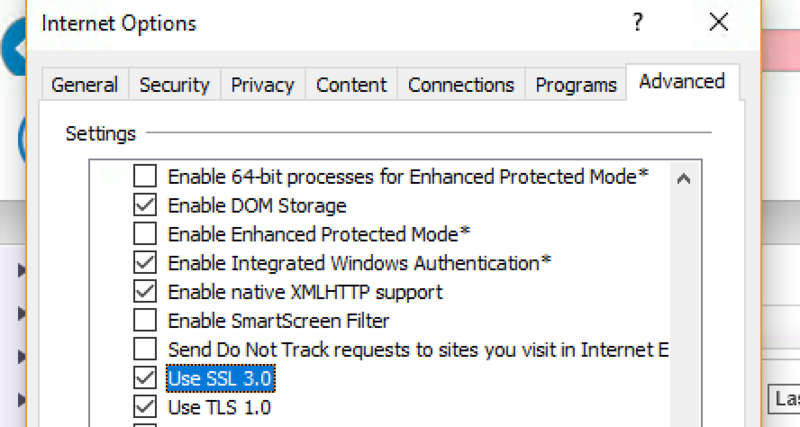
You’ll get the error again, go to internet options, advanced tab, scroll down and enable SSL 3.0
Also:
Chrome and Firefox recently stopped supporting RC4 based certificates. Many SW self-signed certs use RC4, thus the error message you are receiving. The two simplest resolutions in this case:
-
Upgrade SW firmware. For Gen 5 use 5.9.1.x. For Gen 6 use 6.2.4.x or later.
-
Disable “Enable RC4-Only Cipher Suite Support” in the SW diag page. Be aware that unchecking this box might cause the sonicwall to reboot.
Curated by Liquid Layer Networks
At LiquidLayer.net, we’ve made a shared web hosting platform that’s both feature-rich and easy to make use of. Our programmers have built up a custom Linux cloud web hosting platform plus an innovative Control Panel that perfectly takes advantage of its capabilities. After long hours of programming and bug fixing on our end, we are now capable to guarantee that all of our shared web hosting services are safe, virus-free, full of capabilities and very easy-to-work-with. In addition, they feature 99.9% server uptime as well as 99.9% network uptime warranties.
Powered by:

HostCheetah Networks
Global Web Hosting, Domain Registration, and Internet Services
https://hostcheetah.net | http://hostcheetah.uk
PC Helper | Est 1996 - Web Hosting | US, AU, UK, Finland, Bulgaria | 
